

Resource Connectors
A resource connection attaches a resource to an activity, so the activity seizes that resource to do its work. You draw it from a resource to an activity, and the type decides when the resource is taken and given back.
Connection types
Section titled “Connection types”- Get / Free: seize the resource for the activity, release it automatically when the activity finishes (the default)
- Get / Keep: seize the resource and hold it across later activities until you free it
- Free: release a resource that a Get / Keep connection is holding
- Alternate: a backup resource used when the primary is busy
Common settings
Section titled “Common settings”Resource connections share a few settings on their General tab:
- Quantity: how many units of the resource to seize (a number or an expression).
- Priority: when several activities compete for the same resource, this sets the order in which they acquire it.
- Setup / Travel Time: the time the resource needs to reach the entity before work begins (
0means instant). This applies to Get / Free and Get / Keep.
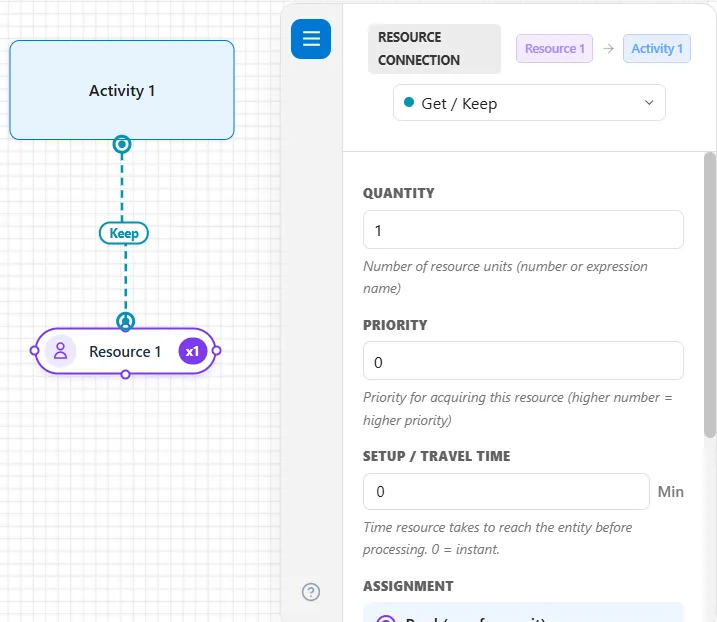
Assignment
Section titled “Assignment”A Get / Free or Get / Keep connection also has Assignment on its General tab, below Setup / Travel Time. It says which unit of the resource serves the case:
- Pool (any free unit): “Any free unit serves the case.” This is the default.
- Dedicated (same worker every visit): “First claim assigns the case to a worker; later claims wait for that worker.”
- Assign only (assign a worker now, use them later): “Admission requires this worker’s caseload headroom and assigns the case. The worker is not held here.”
Dedicated and Assign only stay gray, with the note “Enable Caseload on Resource 1 first” (the name is the resource’s own), until the resource’s Caseload is turned on. Once it is on, and the resource is in a resource group, the two choices carry a second line: “Binds across the group’s on-shift members.” The pictures are in Get and Free Connector and Get and Keep Connector.
On a connection left on Pool, from a resource that is in a resource group, a checkbox reads Someone other than the person it is assigned to: “Anyone on the team is eligible except the worker already carrying this case.” It is gray, with a note to turn a caseload on for the resource first, until the resource’s Caseload is on. It is not offered on Dedicated or Assign only.
LegacyHow this worked in the previous version
A resource connection assigns a resource to perform an activity or conduct a move. Resource assignments use connectors as shown below or use action logic. Connectors are fast, easy, and automatically handle the proper collection of statistics, while action logic provides greater control of resource assignments, but requires more effort. To learn more about assigning resources in the action logic see What is a Get statement?
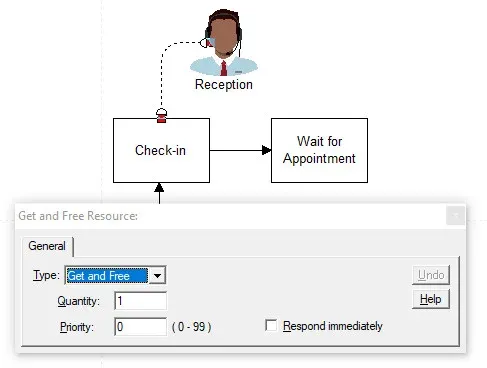
A resource assigned to the Check-in process.
The resource assignment starts when an entity enters the activity or when the entity is released to move on a route. The Get and Free use the resource for one task (activity or move), then automatically releases the resource for other assignments.
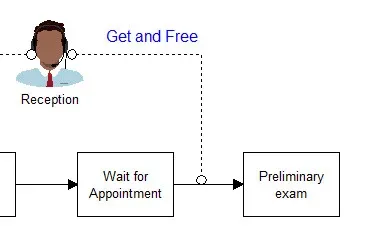
The resource is assigned to escort people from Waiting to Exam.
Assign multiple tasks in succession
Section titled “Assign multiple tasks in succession”To assign multiple tasks in succession, use a Get connection on the first and a Free on the last activity. In the example below, the worker is required before an entity can proceed to start process of the three activities. After finishing all three activities and the associated moves, the entity releases the resource and continues in the flow.
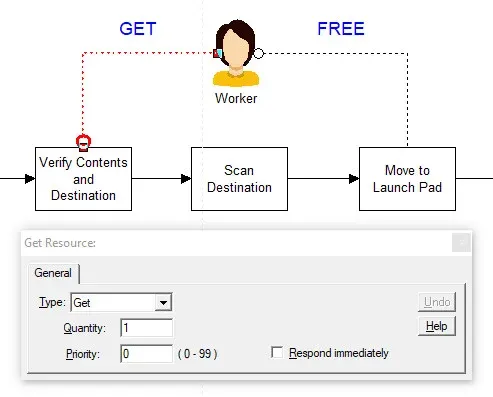
Multiple activities and moves are performed in succession.
Capture multiple resources for a single entity
Section titled “Capture multiple resources for a single entity”No individual of a multi-resource request accepts the Get until all units become available. At Cessna Aircraft, airplanes move from station to station during production. Workers push the plane, advancing it to the next position. Union rules require eight people before a push occurs. The information below shows the assignment of eight workers. After finding eight people, the capture occurs, and the move time starts. The assignment of multiple resources must not be confused with the number of resources. The number of resources stays the same.
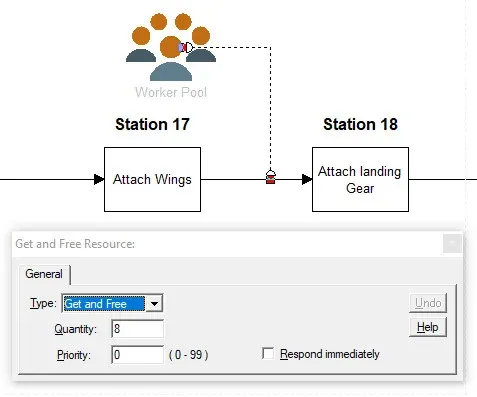
Assigning multiple resources to the same entity.
Assign resources to multiple activities
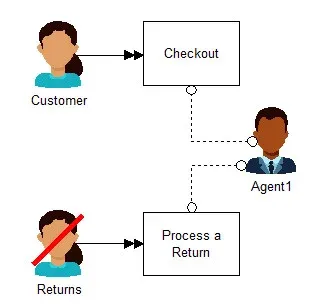
Section titled “Assign resources to multiple activities”When captured, a resource becomes unavailable for use by other activities. For example, if Agent1 is performing the activity “Process a Return,” they won’t be able to “Checkout” a customer at the same time.
Prioritize the work
Section titled “Prioritize the work”When two or more activities request the same resource, a priority decides the first selected. The greater the number the higher the priority. For example, a call center does both inbound and out bound calls. Queued inbound calls always receive priority over making outbound calls.
Priority entries range from 0 to 99. Selecting the Respond Immediately checkbox make the priority preemptive. A preemptive priority means this request overrides the current work and pulls the resource. To find greater detail about priorities and preemption see What is a Resource Priority?
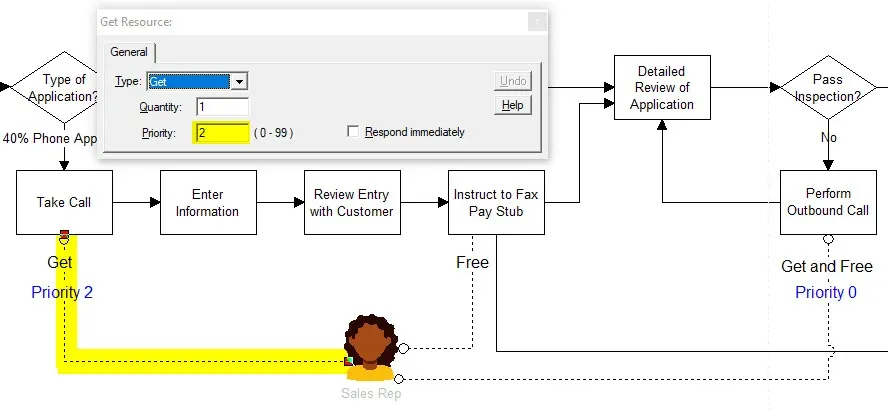
Entities waiting for resources always select the connection with the highest priority.
Alternate resources, resources on different shifts
Section titled “Alternate resources, resources on different shifts”Multiple or alternative resources may be used for an activity or move. An alternate resource might be coworker that steps in an overwhelming surge, during breaks or lunch, or resources on second and third shift. If the first resource is unavailable then the second resource connection is attempted.
If Shift1 is not available then the Shift2 connection is tried.