

Resource Sharing
A single resource pool can serve several activities. Connect the same resource to each activity that needs it; when more than one activity wants it at the same time, ProcessModel arbitrates by priority and first-come order.
For example, a pool of eight paralegals connected to both a Research activity and an Appeals activity is drawn from by whichever activity needs one, up to the eight available.
Use Resource Priority to favor one activity over another, and a resource group when an activity needs a specific combination of shared resources.
LegacyHow this worked in the previous version
Sharing resources between two or more activities. Useful when a resource may be used at more than one activity.
Suggested Technique
Section titled “Suggested Technique”- Connect the resource to the activities that use it.
- Optionally define priorities where activities have higher or lower priority.
- Check respond immediately when an activity may interrupt another activity’s use of the resource.
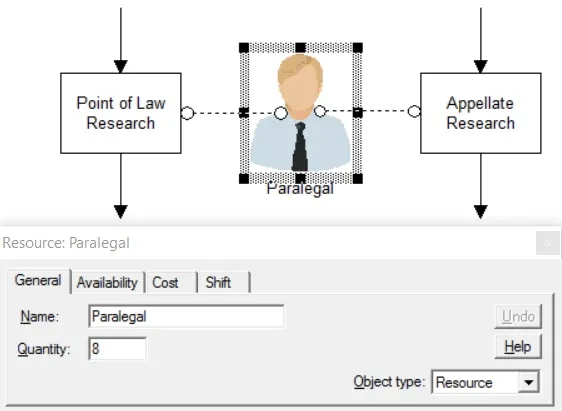
Example**: A law office has a shared pool of 8 paralegals that perform various activities in the office. When a file is routed to the Point-of-Law Research activity a paralegal is required, and when a file is routed to Appellate Research a paralegal is also required. Both activities have been defined with a capacity of 8 in order to take full advantage of the paralegals when they are available.
TO DO: Define the Paralegal as a resource with a quantity of 8 as shown above. Connect the Paralegal to the two activities which require their service. Once a paralegal is available, the activity that is waiting for him or her may be performed.