

Assigning Values
These statements change the value of a variable or an attribute.
| Statement | What it does | Example |
|---|---|---|
SET … TO | Assign a value or expression | SET a_Status TO 1 |
= | Assign directly (same as SET) | v_Total = v_Total + a_Cost |
INC | Increase, by 1 or a given amount | INC v_Count · INC v_Count BY 2 |
DEC | Decrease, by 1 or a given amount | DEC a_Stock · DEC a_Stock, 5 |
RESET | Return to the starting value | RESET v_Total |
CLEAR | Does what RESET does: back to the starting value, else 0. Given a signal’s name, it clears the signal | CLEAR v_Flag |
The left side of an assignment must be a variable, an attribute, Entity.<name> or an array cell. The run stops on anything else, with a message such as '5 = v_T' is not a statement: the left of '=' must be a variable, an attribute, Entity.<name> or an array cell., and on a write to a name that does not exist, such as 'Colr' is not an attribute of this model or a property of Entity (Entity.Colr = 5). The editor already flags that name as “Unknown Entity property”.
Local variables
Section titled “Local variables”When you only need a value inside one block of logic, declare a local variable with Real (a number) or Int (a whole number). Its name is prefixed lv_, it exists only while that logic runs, and it is not shared with the rest of the model, unlike a global variable:
Real lv_LineTotalSET lv_LineTotal TO a_Price * a_QtyLegacyHow this worked in the previous version
( ) = ( ) This is the assignment statement which allows you to assign a value (or descriptor) to a variable or to one of the attributes defined for your entities.
Syntax
Section titled “Syntax”YXNzaWduZWUgPSBhc3NpZ25vcg==
**assignee **The variable or attribute to which the value is assigned.
**assignor **The value assigned to the variable. This could be another variable or attribute, a pre-defined descriptor, or a mathematical expression.
Example
In the first example, the attribute a_ Attr1 is assigned a value of 2. The second example assigns the value of a_ PO_No to the attribute a_ Invoice_No . Number three assigns the descriptor Red to the attribute a_ Color . And the last example assigns the product of 5 and the value of Base to the attribute a_ Size.
-
a_Attr1 = 2
-
a_Invoice_No = a_PO_No
-
a_Color = Red
-
a_Size = 5 * Base
[
Logic Statements](/help/statements/)
INC statement
Section titled “INC statement”The increment statement allows you to increment a variable or attribute’s value. It adds one (the default) or more to the value of the variable or attribute.
Syntax
Section titled “Syntax”SU5DIG5hbWUgWywgZXhwcmVzc2lvbl0=
**name **This is the name of the variable or attribute to be incremented.
[expression] You can optionally increment the variable or attribute by more than one using an expression which can be a constant or a mathematical expression. The name and expression must be separated by a comma. (The square brackets illustrate only that this element is optional.)
Example
The following are several easy-to-understand examples. The first increments the value of v_ Var1 by one. The second increments the value of a_ Attr1 by five. And the third increments the value of v_ Number_in_System by the value of v_ Num_Processed plus one.
-
INC v_Var1
-
INC a_Attr1, 5
-
INC v_Number_in_System, v_Num_Processed +1
Logic Statements](/help/statements/)
DEC statement
Section titled “DEC statement”Decrement of a variable or attribute’s value. It subtracts one (the default) or more from the value of the variable or attribute.
Syntax
Section titled “Syntax”REVDIG5hbWUgWywgZXhwcmVzc2lvbl0=
**name **This is the name of the variable or attribute to be decremented.
[expression] You can optionally decrement the variable or attribute by more than one using an expression which can be a constant or a mathematical expression. The name and expression must be separated by a comma. (The square brackets illustrate only that this element is optional.)
Example
The following are several easy-to-understand examples. The first decrements the value of v_ Var1 by one. The second decrements the value of a_ Attr1 by five. The third decrements the value of Number_in_System by the value of an attribute called a_ Batch_Size.
-
DEC v_Var1
-
DEC a_Attr1, 5
-
DEC Number_in_System, a_Batch_Size
Combining the DEC statement with the INC statement allows visualizing work in process (WIP) in a model, an area of a model, or a queue. For example, a hospital might want to track the number of people in the waiting room to visualize waiting volumes when changing model operations.
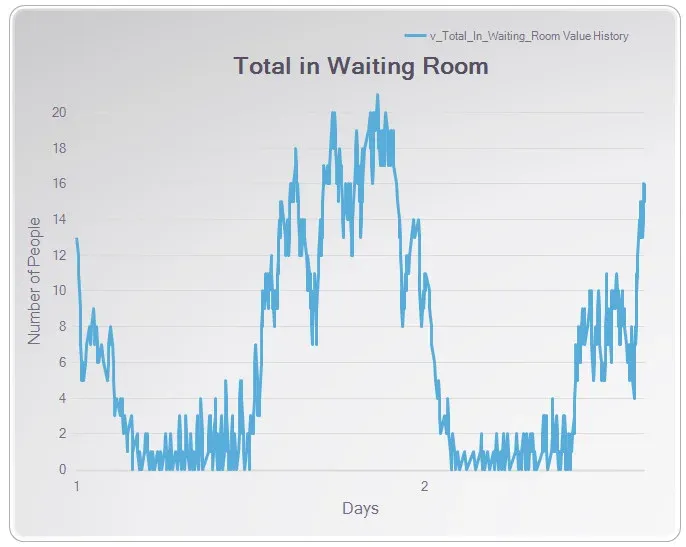
Plotting a variable captured with the INC and DEC statements.
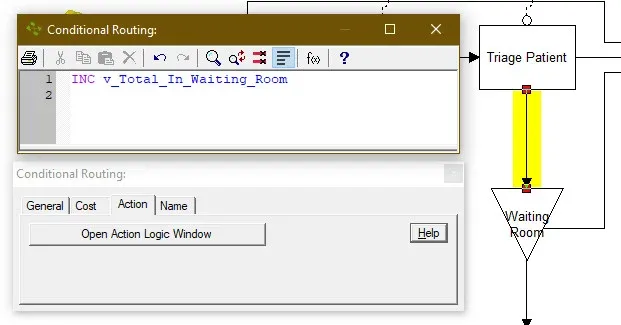
Using the INC and DEC statements combined to track the number of people in the waiting are of the ER.
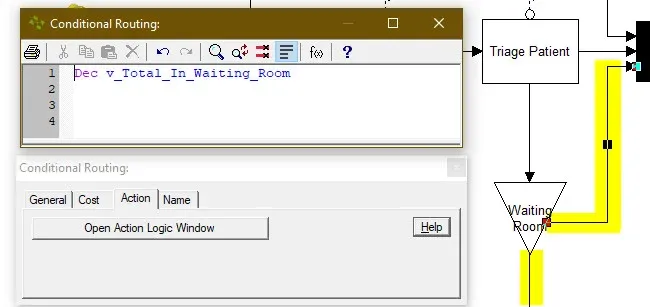
Using the DEC and INC statement combined to track the quantity of people in the waiting room.
Logic Statements](/help/statements/)