

Care models
A care model is a way of running the department that adds its own elements to your model. The title is plural by one: there is a single care model, Provider in Triage.
Provider in Triage
Section titled “Provider in Triage”Provider in Triage puts a provider at triage. Rest the pointer on its name and its description appears: “A provider sees each patient at triage within minutes, treats and releases the simple cases, and sends the rest on.” It adds its own staff and rooms, named PIT providers, PIT RNs and PIT rooms, and the steps that use them, after Triage.
A mark beside its name follows the visits in your model: Rarely used under 12,000 visits, Possible from 12,000 and Suited from 25,000. Rest the pointer on the mark to see its full label and the reason. From 12,000 visits the start screen also asks about this care model. See Start a typical emergency department.
In a scenario
Section titled “In a scenario”A scenario can switch a care model on or take it out of the model. Open Tools ▸ Logic Builder, choose Scenarios, and open a scenario of a model that has the Emergency Department lens on. Beside Add Object is a button, Care models. It opens a list under the heading FRONT DOOR.
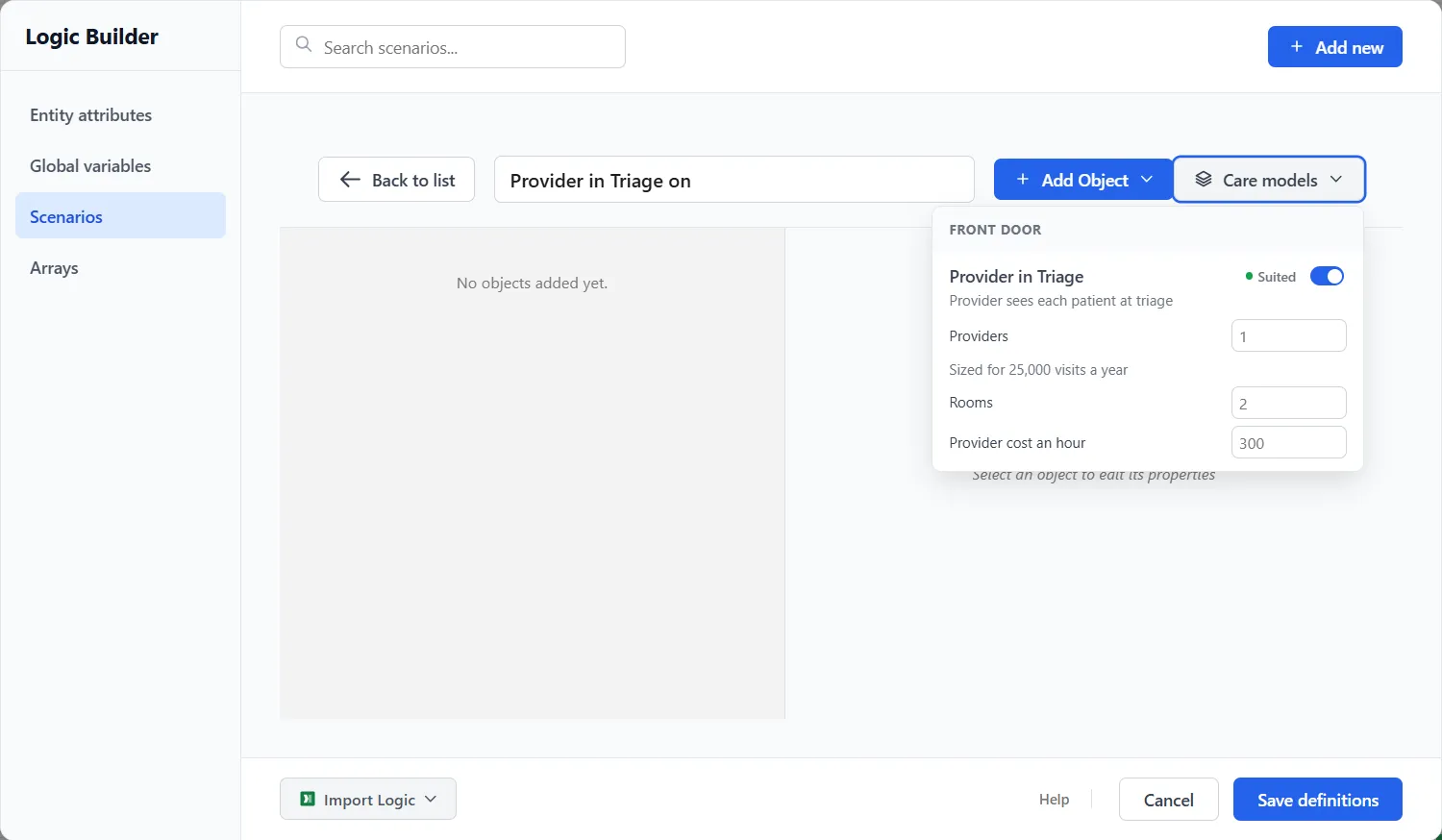
Each row shows the care model’s name, its mark and a switch. In the picture Provider in Triage is marked Suited, with the line “Provider sees each patient at triage” under its name and its switch on.
With the switch on, boxes appear for what the care model adds: Providers, Rooms and Provider cost an hour. Each shows its sized value in gray, here 1, 2 and 300. Type a number to use your own in this scenario. Under the first box a line reads “Sized for 25,000 visits a year”, or “Sized when the scenario runs” when the editor cannot see the number the run will use.
A row also has a state, in words:
- Off and On are the two positions of the switch.
- In the model replaces the switch when the model already holds the care model. The button Remove in this scenario takes it out for this scenario. If the scenario also switches it on, Leave it in the model drops that switch.
- Removed replaces the switch when the scenario takes the care model out. Put back undoes the removal.
When a care model could join the model in more than one place, the row asks Where it joins, and the box starts at Pick one.
What a scenario does with it
Section titled “What a scenario does with it”A scenario’s care models are built into its run: a care model switched on is added when the scenario runs, and a care model removed in the scenario is taken out. A PM Optimizer study seeded from the scenario keeps them. For scenarios in general, see Scenarios and the Logic Builder.