

Tracking Resource Use
ProcessModel reports how each resource was used in the Resources section of the results. The default view shows each resource’s Resource Name, Utilization, Total Cost, State Mix (in use, waiting, overtime, break, down, idle, off-shift), Units, Times Used and Signal. Avg Time Per Usage and the cost columns stay hidden until you restore them in the Columns picker.
During a run, each resource on the canvas shows how many of its units are in use, and you can click it to see exactly which entities are holding it.
To read the resource an entity is using from inside logic, use Entity.HeldResourceName() (the name of a unit it holds) and Entity.HeldResourceCount (how many it holds). See OwnedResource Function.
LegacyHow this worked in the previous version
Tracking the number of times a particular resource is used for a particular activity or set of activities.
Suggested Technique
Section titled “Suggested Technique”- Create a variable used to track the statistic.
- In the appropriate Action logic, test for the resource being used.
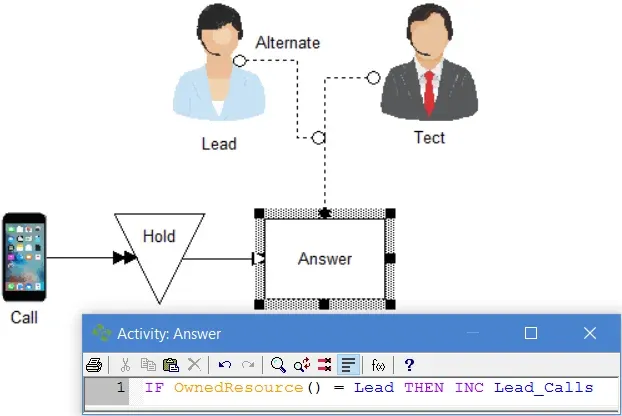
- Based on the outcome of the test, increment the tracking variable accordingly.
Example: A team leader takes support calls when no other technicians are available. We want to know how many calls the team leader is taking. A variable called Lead_Calls is defined to track the number of calls the team leader takes.
TO DO: Define the variable Lead_Calls . In the resource connection for the Lead, select the Use as alternate option. Enter the Action logic as shown in the above illustration in the Answer activity.
Determining the resource being used
Section titled “Determining the resource being used”When an alternate resource is captured by an entity and a decision or activity time depends on which resource was captured, the OwnedResource function may be used to determine which resource was captured.
Suggested Technique
Section titled “Suggested Technique”- In the action logic of the activity or routing, use the OwnedResource() function without a number between the parentheses to test the name of the most recently captured resource.
- Execute the appropriate action based on the name returned by the OwnedResource() function.
Alternatively, you may use the GET statement with an OR separating the alternate resources in the Action logic to capture the resources, and then use the OwnedResource() function to determine the captured resource. Connected resources will always be captured before resources specified in a GET statement. On the other hand, resource connections that free a resource occur after any Action logic for the activity.
Example: A receptionist usually answers the phone, but if the receptionist is busy, the filing clerk will answer the phone. If the filing clerk answers the phone, the call lasts about 7 minutes, otherwise it takes about 5 minutes.
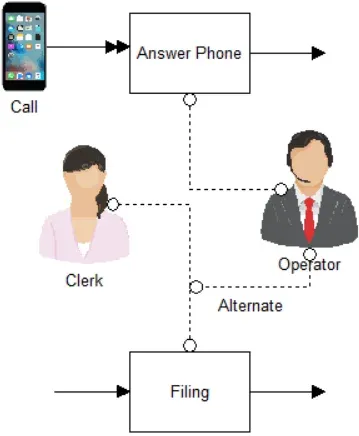
TO DO: In the Action logic of the Answer Phone activity, enter:
SUYgT3duZWRSZXNvdXJjZSgpID0gQ2xlcmsgVEhFTiBUSU1FKDcgbWluKQpFTFNFIFRJTUUoNSBtaW4p
To learn more about the OwnedResource() function, see OwnedResource(n).