

Keyword Pick Lists
Keyword pick lists are no longer part of ProcessModel. The original help is kept below for reference.
LegacyHow this worked in the previous version
To simplify the process of entering Variables, Attributes, Resources and Scenario Parameters into fields, pick lists can be accessed by using a right-mouse-click inside any field requiring entry of this type. This selection of data by pick lists removes the opportunity for error due to typing mistakes or failure to include underscores, etc.
How To - Use a pick list
Section titled “How To - Use a pick list”- Right-mouse-click inside any field where an Attribute, Variable or Scenario parameter could be used.
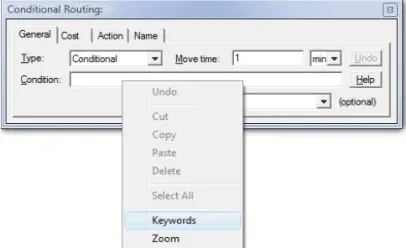
- Select the **Keywords **menu item.
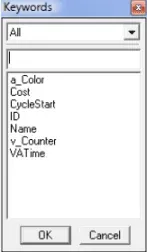
- Select the desired attribute, variable, resource or scenario parameter from the selection list. You can filter the list of items displayed by clicking the drop down list and selecting the item type to display.