

Model Elements
You build a model from a small set of elements. They live on the palette down the left side of the canvas: drag one onto the workspace, drop it, and its properties open so you can fill in the details.
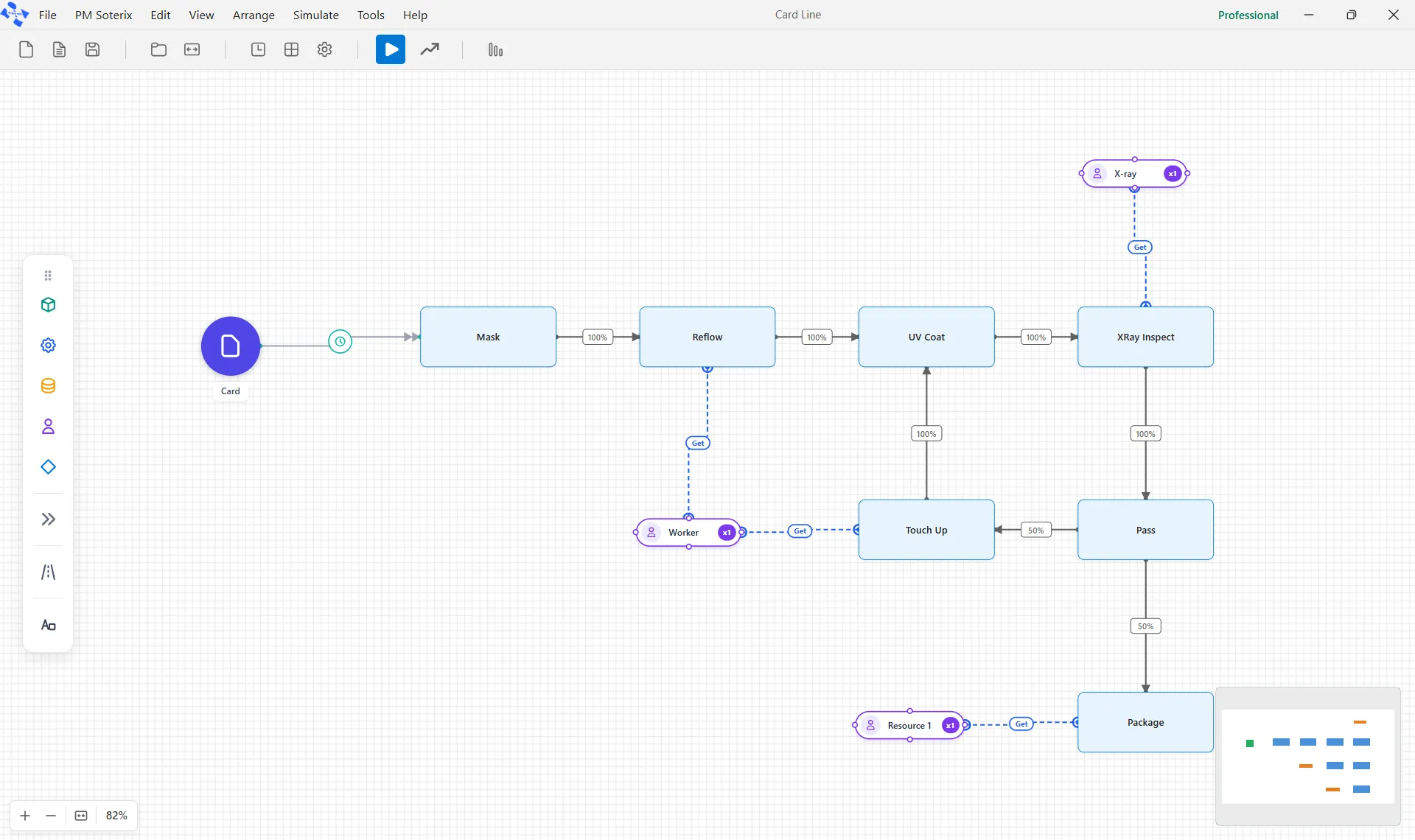
The core elements
Section titled “The core elements”- Entity is the item that flows through your process, such as a customer, an order, or a part.
- Activity is a step that acts on entities, with its own capacity and processing time.
- Queue is a holding area where entities wait, with a discipline such as first-in-first-out.
- Resource is a person or machine that does the work, with a quantity, shifts, and cost.
- Decision is a junction that routes entities down different paths.
You connect these with routes, the arrows that carry percentages or conditions, and you start the flow with an arrival that sets how and when entities enter.
More elements
Section titled “More elements”The last button on the palette, a double chevron, opens the Advanced Nodes flyout for the rest: Batch and Unbatch (group entities together, then split them back), Gate (hold and release by a condition or a schedule), Signal (a named trigger for logic), Inventory (stock with zones and reorder rules), Transition (a junction where two kinds of route meet; see Routing), and Process Group (a reusable sub-model you can collapse or call).
Below it, the Path button draws paths: the floor that a resource which moves along paths, such as a forklift or a picker, travels on, with path nodes and segments of typed lengths. See Drawing Paths.
Adding behavior
Section titled “Adding behavior”Any element can carry action logic, a small language for custom behavior such as setting an attribute, choosing a resource, or counting something. Models also hold variables and per-entity attributes that you can read and write as entities move through the process.
LegacyHow this worked in the previous version
Entities
Section titled “Entities”Entities are the items or people being processed, e.g., products, documents, customers, etc. An entity is defined by selecting an entity shape from the shape palette, placing it on the layout, and entering any applicable information for that object in the properties dialog (learn more).
Arrivals
Section titled “Arrivals”Arrival connections define how entities enter the system to begin processing. Define arrivals by connecting an entity to an activity or storage and entering clarifying information in the properties dialog. The double-headed arrow identifies arrivals (learn more).
Activities
Section titled “Activities”Activities define the process steps and work accomplished on the entities, e.g., such as assembly, document approval, or customer checkout. First, define an “activity” by selecting one of the white icons in the middle of the palette and then clicking on the layout (learn more).
Storages
Section titled “Storages”Storages are waiting areas, stock places, etc. where entities can wait for further processing. Storages are useful when controlling the order in which entities are allowed to move on through the model (learn more).
Routes
Section titled “Routes”Routings, the connectors between activities (and storages), define the direction and conditions for entity flow. In addition, an “activity” or “storage” may have multiple input and output routing connections. They provide the direction and conditions for entities flowing through a process (learn more).
Action Logic
Section titled “Action Logic”This is the ability to drop in simple code within Arrivals, Activities, Storages, or Routes. Action logic provides a way to extend the capability of ProcessModel. Simple action logic might assign values to an attribute. More complex action logic might select different resources based on an attribute setting (learn more).
Resources
Section titled “Resources”Resources are the agents used to perform activities and move entities such as service personnel, operators or equipment. More than one unit of a particular resource may be defined if they are used interchangeably and have the same operating characteristics. Resources limit production based on scarcity of availability, shifts, priority (learn more).
Resource Connectors
Section titled “Resource Connectors”Resources are the agents used to perform activities and move entities such as service personnel, operators or equipment. A fast and simple method of assigning resources to work or movement of entities (learn more).
Model Objects
Section titled “Model Objects”Model Objects combine any or all ProcessModel elements plus external files to solve complex modeling problems. For example, a model object might import, analyze, and create distributions from raw data, then use entities, arrivals, activities, and action logic to represent patterns of arrivals - cutting the modeling time from hours to minutes. There are hundreds of model objects for all types of processes (learn more).