

Batch: Intermediate
The Batch node’s Basic tab decides when a batch leaves. The Intermediate tab decides who is in it: the order entities are drawn in, which of them are allowed to share a batch, and how much room there is in front of the node.
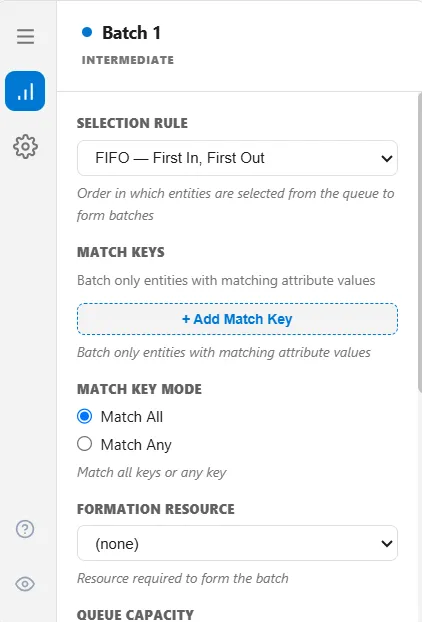
Selection Rule
Section titled “Selection Rule”When more entities are waiting than a batch needs, Selection Rule sets the order they are drawn in.
| Rule | Draws |
|---|---|
| First In, First Out | The entity that has waited longest (the default) |
| Last In, First Out | The most recent arrival |
| By Attribute | The highest or lowest value of an attribute you name |
| First Expired, First Out | The soonest expiry, from an expiry attribute you name |
| Earliest Due Date | The soonest due date, from an attribute you name |
| Oldest in System | The entity that has been in the model longest |
| Random | Any waiting entity |
| Weighted Random | Random, weighted by a table you supply |
Three fields appear only for the rule that needs them:
- Attribute Name for By Attribute and Earliest Due Date, with a Selection Order of highest or lowest first. Earliest Due Date ignores that order and always takes the earliest, so the setting only affects By Attribute.
- Expiry Attribute for First Expired, First Out, holding the expiry timestamp to sort on.
- Match Attribute and a Weight Table for Weighted Random. Each row pairs an attribute value with a weight, and an entity whose value is not in the table weighs 1. A Weighted Random rule with an empty table is just plain random, with no warning, so fill the table in.
Match Keys
Section titled “Match Keys”By default any waiting entities can batch together. Match Keys narrow that: name one or more keys and only entities that agree on all of them (or, with Match Key Mode set to Match Any, on at least one) can share a batch. A key is either an attribute or the built-in TypeName, so “one product per box” is a single key.
Leave a key row blank and it matches everything, which quietly puts every waiting entity in the same bucket. Delete the row instead.
Formation Resource and Formation Time
Section titled “Formation Resource and Formation Time”Name a Formation Resource and the batch node seizes it while the batch forms, for the Formation Time you set. This is how the labour or equipment of packing shows up in resource utilization and cost.
It does not gate the work. If the resource is busy when a batch starts forming, formation goes ahead anyway rather than waiting. Use it to account for the effort, not to constrain the rate.
Queue Capacity and Max Concurrent Batches
Section titled “Queue Capacity and Max Concurrent Batches”- Queue Capacity limits how many entities can wait in front of the batch node. Leave it blank for no limit. Set it and entities back up upstream once it is full.
- Max Concurrent Batches is how many batches may be open at once, 10 by default. It is counted per match-key combination, not per node, so a node batching six product types can have six times this many batches open.
Max Size
Section titled “Max Size”Max Size is a hard ceiling on members. A batch that reaches it is released immediately, whatever the release rule says.
The box accepts anything, but only a plain whole number works here. A variable or a distribution is not evaluated, and the result is no cap at all rather than an error. If you need a batch size that varies, put the expression in Target Batch Qty on the Basic tab, which does accept one.
The batch node’s other tabs
Section titled “The batch node’s other tabs”- Batch: the Basic tab, target quantity and release rules
- Batch: Advanced: aggregation, timeouts, eligibility, yield, and nesting