

Activity Cost
An activity’s Cost tab sets what the step charges the entities it processes, and how the work it does is classified.
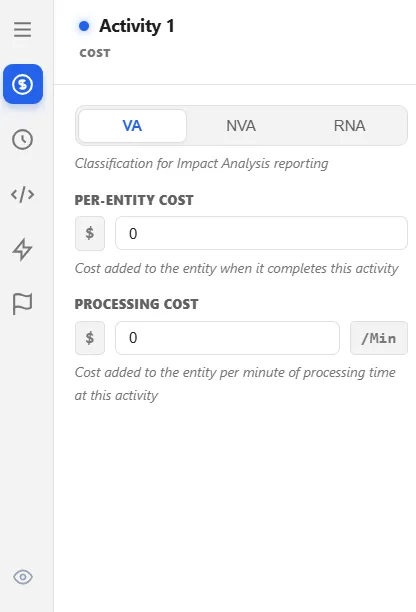
Value Add Classification
Section titled “Value Add Classification”VA, NVA, and RNVA describe the work: value-added, non-value-added, and required non-value-added. Pick the one that honestly describes the step from the customer’s point of view. Inspection and rework are usually non-value-added. A step you must perform to satisfy a regulator, but which the customer would never pay for, is required non-value-added.
This is not a label for the report. The classification you choose here:
- decides which cost bucket this activity’s Processing Cost goes into
- decides which time bucket the entity’s time inside the activity goes into
- decides how any resource held here is classified while it works, so the setting reaches beyond this one node
Change it and the numbers change. Impact Analysis and the bottleneck ranking are both built from these buckets.
Per-Entity Cost
Section titled “Per-Entity Cost”A flat charge added to each entity as it completes the activity, whatever the step took. Use it for a per-item fee, a consumable, or a handling charge.
One thing to know: Per-Entity Cost is always booked as value-added, even on an activity you have classified NVA. If you want the classification to govern the charge, use Processing Cost instead.
Processing Cost
Section titled “Processing Cost”A charge per minute of processing. ProcessModel bills it once, up front, on the time the operation is scheduled to take, which is the processing time plus any setup or travel time a resource needs before work starts. It is not metered against elapsed time, so an activity that is interrupted part way through is still billed its full nominal minutes once, and the gap while it waits to resume is not billed again.
Processing Cost follows the classification above, so it is the field to reach for when you want cost and value classification to agree.
What this does not cover
Section titled “What this does not cover”Cost from resources, queues, routes, and the entity itself is set on their own tabs and adds to the same running total. See Costs in a model for how the five surfaces compose, and the Costs report tab for reading the result.