

Conditional Route
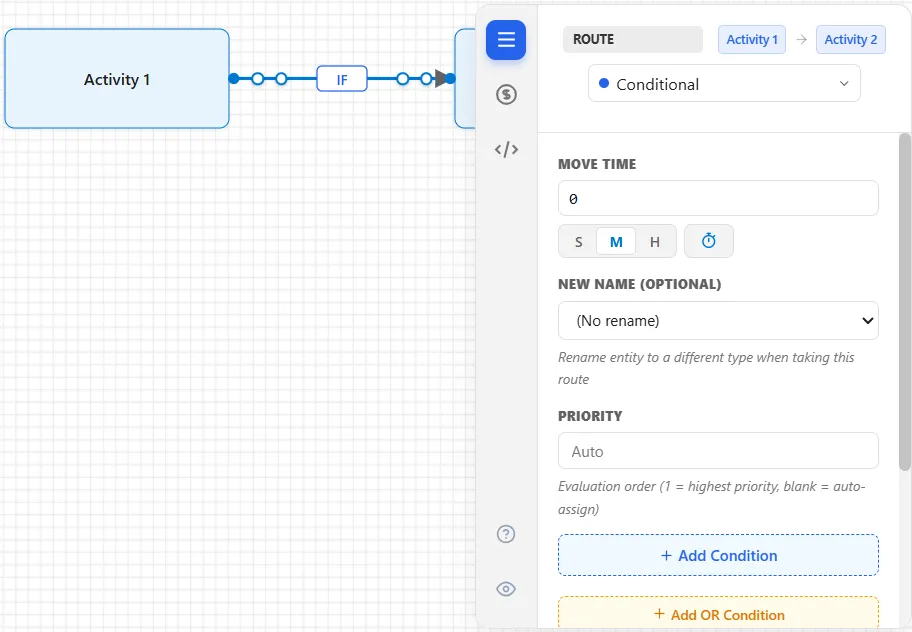
A conditional route sends an entity down this path when a condition you define is true, usually based on the entity’s name, an attribute, or the model’s state. When a source has several conditional routes, they are checked in priority order and the first match wins.
Setting the condition
Section titled “Setting the condition”- Priority: the order conditions are checked (
1is highest). Leave it blank to order by the sequence you drew the routes. - Condition: the test that selects this route, built in the condition editor. For example
Name = "Fax"ora_Value <= 10000. Combine tests with AND and OR.
Catch-all (else)
Section titled “Catch-all (else)”Leave the condition blank on the last conditional route from a source and it becomes the catch-all: the entity takes it when none of the other conditions match. If there is no catch-all and nothing matches, the entity waits at its source until a condition becomes true. This replaces the separate “Else” route from earlier versions.
For the Cost, Logic, and Seed tabs, see Cost, Logic, and Seed.
LegacyHow this worked in the previous version
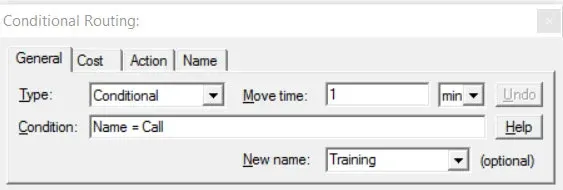
A conditional route causes entities to choose a routing based on some condition (usually a name or other entity attribute). This is one of the most powerful and diverse routes available in ProcessModel.
- The name of an entity creates a need to process along a different set of activities. For example Calls are processed one way while Faxes are processed by different activities.
- The process routing changes based on the time of day. If it is before 10:00 PM then one route is followed, but between 10:00 PM and 6:00 AM another route is followed. This time based decision would require that the variable be changed to reflect the time of day. See “Creating User-Defined Variables”.
- The process routing changes based how high a priority, how valuable, if the entity is over due or if it has already been down a route. These entity specific types of decisions would require the creation and assignment of an attribute. See “Creating User-Defined Attributes”.
- The process routing changes based on the number of resources available in process alternatives. Making resource based decisions requires definition of resources and the use of Functions. See “FreeUnits(name of activity or resource)” . Many other model parameters may be checked.
- In a job shop (production facility designed to manufacture a wide variety of products) the number of entities and the potential variation of routings can be overwhelming if conventional model building techniques are used. To simplify the building process, conditional routings may be used at each processing juncture. An attribute may be defined to correspond with each juncture. Instead of many entity types, one entity type can be defined with attributes that tell the entity which route to take at each juncture. Scheduled arrivals are defined with attributes so that the entity “knows” what path to take at each juncture. For more information see Scheduled Arrivals.
Move Time Time to move to the next activity or storage. Any expression is valid.
**New Name **Optionally assign a new name to the entity. This also assigns a new graphic to the entity if that graphic is defined as an entity on the layout.
An entity can be renamed using either the New Name drop down list in a routing Properties Dialog Box, or the NEWNAME statement in action logic. When renaming, all attributes from the original entity are inherited except the system created attributes ID and Name. The system created attributes which are inherited are Cost, CycleStart, and VATime.
Condition This is the condition for selecting this route (e.g Name = entity name). You may leave the field blank for a single unconditional routing which is equivalent to specifying a 100% routing. Complex expressions are also allowed using **AND **and **OR **operators (e.g. Att1 = 2 OR Att1 = 5). Any expression is valid. Valid comparison operators in conditional expressions are as follows:
= equal to
greater than
< less than >= greater than or equal to
<= less than or equal to
<> not equal to
OR one of or both expressions
AND both expressions
Example
Section titled “Example”Insurance policies are treated differently if they are valued at less than $10,000. The process is different, expending less resources and time. When policies enter the system they have a field that contains the value of the policy. In ProcessModel this would be an entity attribute . In this example it was called a_Policy_Value. The conditional routes out of the decision are evaluated in the order draw. If the value of the attribute a_Policy_Value is less than or equal to 10000 then the top routing is chosen. If the value is greater than 10000 the bottom route is chosen.
- If one or more Conditional routings are defined together, a conditional routing with the Condition field left blank may be used as a “last resort” routing. This Conditional routing must be the last routing connected to the activity. If none of the conditions in the other Conditional routings are satisfied, the entity will be routed along this “last resort” routing.
Routing Types
Section titled “Routing Types”The following routing types are available:
Else route
Section titled “Else route”An Else routing is executed if none of the one or more Attach , Pickup , or Ordered routings with which it is associated can be executed. An analogy might help to explain how the Else route would work in conjunction with an Attach route. An understanding of the attach route is important before this analogy will make sense. If the main entity is the Parent and the attaching entity is the Child then the Else route would tell the child what to do if the Parent didn’t show up. The Child arrives at the activity that has the attach route and looks for a corresponding parent at the destination. If the Parent has not yet arrived, then the Child follows the Else route. The Else route in conjunction with the Pickup route allows for the Parent to leave if the Child is not ready when the Parent arrives.
Only one Else routing may be defined from an activity or storage having Attach, Pickup, or **Ordered **routings. However, an Else routing may have an alternate routing attached to it, which effectively allows for multiple Else routings.
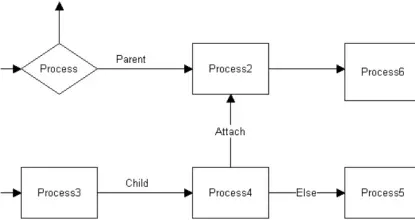
If the Else routing is unable to be executed because of insufficient capacity at the next activity, the first of all the routings that can be satisfied is executed. For example, if an activity has two Attach routings and an Else routing connected from it, and neither of the Attach routings have an entity waiting for an attaching entity, then the Else routing will be executed if capacity is available. If capacity is unavailable, the entity waits for the first routing that can be executed.
Else Routing with a Group of Attach Routings
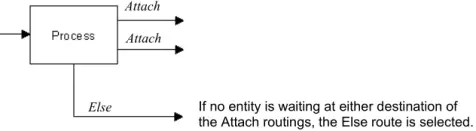
Section titled “Else Routing with a Group of Attach Routings”If no entity is waiting at the connecting activities for this entity to be attached, the entity will be routed via the Else route.
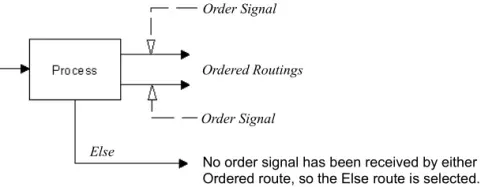
Else Routing with a Group of Ordered Routings
Section titled “Else Routing with a Group of Ordered Routings”If no order signal has been given, the entity will be routed via the Else route.
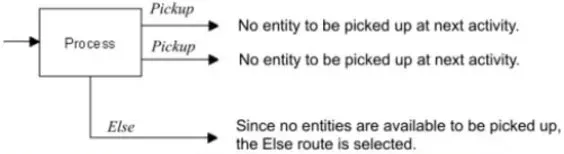
Else Routing with a Group of Pickup Routings
Section titled “Else Routing with a Group of Pickup Routings”If no entities are waiting to be picked up at the destination activity or storage, the entity doing the picking up will be routed via the Else route.
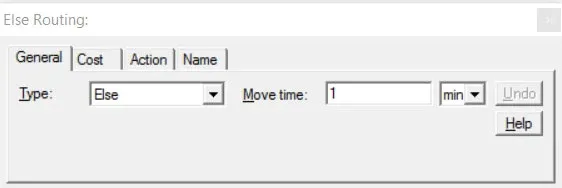
Move Time Time to move to the next activity or storage. Any expression is valid.
DO NOT use an Else routing with an Alternate, Conditional, Detach, Else, Percentage, or **Renege **routing. Doing so will cause an error to occur when you run the simulation.
Routing Types
Section titled “Routing Types”The following routing types are available: