

Activity Shift
An activity shift sets when an activity (a processing step) is open. It works the same way as a resource shift, applied to the activity itself: outside its scheduled hours the activity is off shift and does not start new work.
Assign a schedule and rules
Section titled “Assign a schedule and rules”On the activity’s Shift tab, pick a shift schedule and set the same two rules a resource has: the Downtime Rule (what happens to the entity in progress when the activity goes off shift) and the Off-Shift Rule (what happens to entities waiting or arriving). The options are the same as a resource shift’s, with one difference: an activity’s Downtime Rule offers Finish Current, Preempt & Wait and Clear Queue First, and Preempt & Pass is for resources only. The schedule can also be picked in the Shift Manager; the two rules are set here, on the activity.
Startup Delay
Section titled “Startup Delay”Activities add one setting that resources do not have: Startup Delay, the time an activity needs to start up when its shift begins before it can process the first entity. The default is zero.
LegacyHow this worked in the previous version
Shift file The name of the shift file which defines the times when this activity can be performed. A default shift file for all activities may be defined in the Options dialog under the Simulation menu.
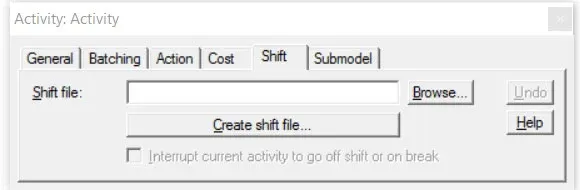
Browse Allows you to search through one or more directories to locate a shift file.
Interrupt current activity to go off shift or on break Check this option if the current activity is to be interrupted in order to go off shift or on break. If not checked, the shift will interrupt the activity only after it has completed processing the current entity.
Create shift file Opens the shift editor for defining a shift and saving it as an .SFT file. For more information, see Shift Definition.
Shift with breaks; The breaks are not included in the scheduled hours reported in the Output report. Example: If you have an 8 hour shift with 1 hour of downtime for breaks and lunch, the Schedules Hours would show 7 hours for a 24 hour simulation run length or 35 hours for a 5 day run length.