

Batch: Advanced
The Batch node’s Advanced tab covers what the batch carries, when its clock starts, who is allowed in, and how deep batches may nest.
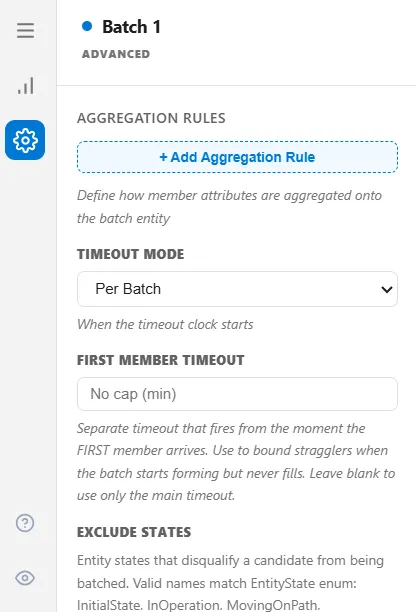
Aggregation Rules
Section titled “Aggregation Rules”An aggregation rule rolls a value from the members onto the batch itself. Each rule names a source attribute on the members, a method, and a target attribute on the batch.
| Method | Result on the batch |
|---|---|
| Sum | The total across members |
| Count | How many members carried the attribute |
| Min, Max | The smallest or largest value |
| Average | The mean |
| First, Last | The value from the first or last member in |
Sum a weight to get a pallet weight, take the Min of an expiry to give the batch the earliest expiry it contains, or Average a priority. Every batch already carries MemberCount, BatchFormedTime, and BatchId without a rule.
Timeout Mode and First Member Timeout
Section titled “Timeout Mode and First Member Timeout”Timeout Mode decides when the timeout clock starts:
- Per Batch starts it when the batch opens. This is the default.
- First Member starts it when the first member arrives. In practice this behaves the same as Per Batch, because a batch does not sit open and empty.
- Per Member restarts the clock as each member joins, so a steady trickle of arrivals keeps the batch alive.
First Member Timeout is a second, earlier cap measured from the first member’s arrival. Use it to stop a nearly-empty batch waiting out the full timeout. It only does something if the Basic tab’s Release When already includes a timeout, and after one miss below the minimum size the batch falls back to the main timeout.
Exclude States
Section titled “Exclude States”A list of entity states that disqualify a candidate from being batched, so an entity in one of those states is passed over rather than pulled in.
Names must match exactly. An unrecognised name is ignored without any warning, so a typo here looks like the rule simply having no effect. Add one name at a time and confirm the behaviour changed before adding another.
Shelf-Life Floor
Section titled “Shelf-Life Floor”A minimum amount of remaining life an entity must have to join a batch, in minutes. It reads the same expiry attribute that First Expired, First Out uses on the Intermediate tab, and that attribute can only be set while that selection rule is chosen. Set a floor without ever choosing First Expired, First Out and nothing happens, silently.
It also fails open on purpose: a member that does not carry the attribute at all is treated as eligible rather than rejected.
Permanent Handling
Section titled “Permanent Handling”Shown when the Basic tab’s Batch Mode is Permanent. It decides what becomes of the members once they are merged: Destroy removes them, Keep Loaded keeps them inside the batch entity. Destroy is the usual choice, since a permanent batch is meant to be one thing from then on.
Target Mode and Expected Yield
Section titled “Target Mode and Expected Yield”Target Mode decides what the Basic tab’s target quantity counts:
- Input Count: the number of members drawn in (the default).
- Output Count: the number of good units you want out the other end.
Choosing Output Count reveals Expected Yield, a fraction from 0 to 1. ProcessModel divides the target by it and rounds up, so a target of 10 at a yield of 0.95 draws 11 members in.
This is a planning figure only. Nothing is actually scrapped. The batch still releases everything it collected, and if you want real losses you model them downstream with a percentage route to a scrap step.
Track Parent
Section titled “Track Parent”Track Parent stores the batch’s id on each member, under the attribute name in Parent Attribute (ParentBatchId by default). Downstream logic can then tell which batch a member came from, which is the traceability link if members are split back out by an Unbatch node.
Nesting
Section titled “Nesting”Allow Nested Batches decides whether a batch may itself be a member of another batch, which is how cases go into pallets. With it on, Max Nesting Depth caps how deep that stacks. Leave the cap blank for no limit.
One thing to plan for: a batch rejected for exceeding the depth is not passed through. It stays in the batch queue and is skipped on every later pass, for the rest of the run. If a run finishes with batches stranded in front of a batch node, check this setting first.