

Gate Flow Control
A gate’s Flow Control tab caps how much work is allowed downstream. There are two ways to do it, and they are alternatives rather than partners: a full kanban card loop, or a pair of simple limits.
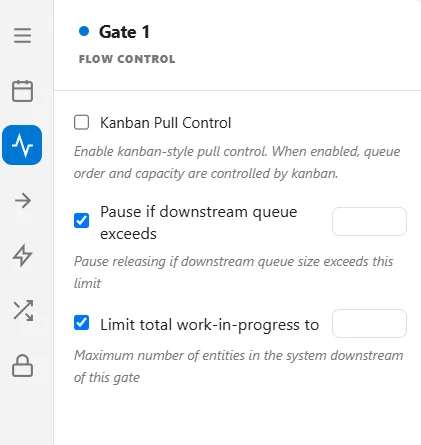
Kanban Pull Control
Section titled “Kanban Pull Control”Turn on Kanban Pull Control and the gate runs a card loop. A fixed number of cards circulate. Each card releases one container of entities, and the card only comes back to be used again when that container reaches a step you nominate. Work in progress is therefore capped at cards times container size, permanently, with no other setting to keep in step.
| Field | What it sets |
|---|---|
| Cards | How many cards circulate. This is the number of containers that can be in flight at once |
| Container Size | How many entities one card releases |
| Watch | The activity a container must reach for its card to be earned back |
| Card Returns | Which arrival at the watched step returns the card |
Card Returns offers first, last, and all. First returns the card as soon as one entity of the container arrives, which recycles cards early and keeps the line fed. Last and All behave the same way as each other: the card comes back once the whole container has arrived.
A kanban gate must have a Watch target. Leaving it empty stops the run with an error rather than releasing without a limit.
What turning kanban on changes
Section titled “What turning kanban on changes”Kanban replaces most of the gate’s other behaviour, so switching it on resets the settings it would fight with: the release mode, the blocking mode, the queue order, both limits below, and the On Open and On Close hooks. That reset is deliberate, but it is silent, so a release mode you set earlier will be back at its default afterwards.
The gate’s Queue Capacity is deliberately left alone. It is still honoured under kanban, so the gate can still refuse and back up work when its own waiting area is full.
The two limits
Section titled “The two limits”With kanban off, the tab offers two simpler caps instead. Tick either one to enable it and set its number.
- Pause if downstream queue exceeds: the gate stops releasing while the queue immediately downstream is longer than this. Use it to stop a fast step burying a slow one.
- Limit total work-in-progress to: the gate stops releasing once this many entities are anywhere downstream of it. This is a constant work-in-progress cap across the whole stretch, not just the next step.
Both disappear while kanban is on, because the cards already are the limit and two competing caps would be impossible to reason about.
For the other ways to control a gate, see Gate Release, Gate Blocking, and Gate Schedule.