

Resource Priority
When several activities compete for the same resource, or several units could serve an entity, priority decides the order.
Set a Priority on the resource connection (or on a member in a resource group). A higher number is served first: an activity with priority 10 gets the resource before one with priority 1. Equal priorities are served first-come, first-served.
A request whose priority is 100 or more above the work the resource is already doing interrupts that work, and a priority of 10000 or more also brings a resource back on duty when it is off shift or on break.
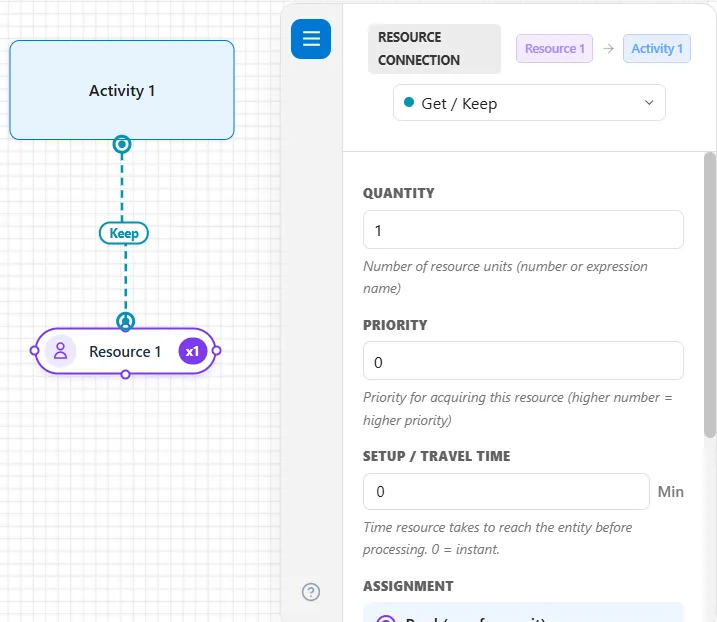
Priority can be a number or an expression, so it can depend on an entity’s attributes, for example giving urgent entities a higher priority.
Rush jobs for a resource that moves along paths
Section titled “Rush jobs for a resource that moves along paths”A resource with Moves along paths ticked keeps the same rules, and adds what a unit on the floor does when a call outranks its job:
- Idle units go first. A call takes a free unit, by the resource’s Selection rule, whenever one can take it.
- A busy unit can be taken only when the call’s priority is 100 or more above the priority of the job it is doing. Among the busy units that qualify, the selection rule chooses, measured from where each unit is now.
- A unit carrying a load is never taken. It delivers first. The call takes another unit, or this one as soon as it has put the load down. A unit staying with its part at a step on the way to its Free is never taken either (see Through every step to the Free).
- How it turns depends on the resource’s Kind: a Person turns at once, a Vehicle finishes the segment it is on and turns at the next node. On a one-way segment even a Person drives on to the next node.
- It goes back to the job it set aside when the rush job is done, by a route worked out from where the rush job ended. If it set aside more than one, the newest goes first.
- Who pays: the rush entity pays for the unit from the moment it turns. The entity whose job was set aside waits, and that wait is its Detour Time on the Output Report’s Flow tab (see Report Tabs).
Equal-priority calls are taken longest waiting first. A call of 10000 or more also takes a free unit that a shift end is holding while another unit finishes its work (see Resource Downtime and Maintenance). A resource on a station schedule has its own Break priority for calls from stations outside the current window (see Order Picking and Station Schedules).
LegacyHow this worked in the previous version
There are 10 levels of priority values: 0 - 99, 100 - 199, 200 - 299 … 900 - 999. 0 - 99 is the only non-preemptive level.
Preemption means that the current work being done by a resource will be interrupted in order for the resource to go to the location of the preemptive GET. After that higher priority work is complete, the resource will return to the interrupted location. Preemption will occur only when the value of the calling priority is at least one level higher than the resource’s current priority.
The calling priority is at least 100 higher than the resource’s current priority.
For example, if a resource is working at a priority of 50, then a priority call of 150 will be required to perform a preemption. The 150 GET will be completed before returning to the initial 50 GET.
Using a priority which is 300 or higher will bring a down (or off shift) resource back on-line (or on shift).
Resource Priority, Shifts, and Interrupt
Section titled “Resource Priority, Shifts, and Interrupt”The Resource priorities, interrupt, shifts, and ‘Interrupt current activity to go off shift or on break’ can be used in a model together, the following restrictions apply.
- A resource priority of more than 100 is an interrupt priority, meaning that if a resource is working on a task that has a lesser priority the resource will leave that task and start working on the priority that is 100 or more.
- If the resource priority is less than 100, but it is higher than the other task the resource is working on, the resource will not leave the task its working on, but will complete it and then come to work on the task with greater priority.
- If ‘Interrupt current activity to go off shift or on break’ is checked on shift of the resource, this will mean that the ‘Interrupt current activity to go off shift or on break’ has a priority of 299. The resource will leave any task its working on and go offline.
- An interrupt priority that is used to have the resource leave the task its working on, and start working on another task will work with ‘Interrupt current activity to go off shift or on break’ if the priority is set to less than 199.
- An interrupt priority of greater than 199 will keep a resource online, even if its scheduled to go offline and ‘Interrupt current activity to go off shift or on break’ is checked.
- An interrupt priority of greater than 599 will bring back an offline resource online, even if its offline and ‘Interrupt current activity to go off shift or on break’ is checked.
Prioritizing resource usage
Section titled “Prioritizing resource usage”When two different activities each have an entity waiting to use the same resource, one activity may have higher priority over another. When that is the case, the resource will be used at the activity with a higher priority specified in the resource connection.
Suggested Technique
Section titled “Suggested Technique”- Select the resource connection that is attached to the activity with a higher priority.
- Enter a priority in the Priority field between 0 and 99. The higher the number the higher the priority (the default is 0).
- Enter the appropriate priorities in the properties dialogs of the remaining resource connections that must be prioritized.
Alternatively, you may use the GET or JOINTLY GET statements in the Action logic with a priority set off by a comma for the resource: GET Resource1, 99 . Connected resources will always be captured before resources specified in a GET statement. On the other hand, resource connections that free a resource occur after any Action logic for the activity.
** Example**: A grocery store uses their available cashiers to restock shelves during slow times, but their cashiering duties have a higher priority than restocking. Note: For the priority to work, customers must be waiting in line (in the input queue) when the resource becomes free. If people are not waiting, the priority will not be the determining factor for selection.
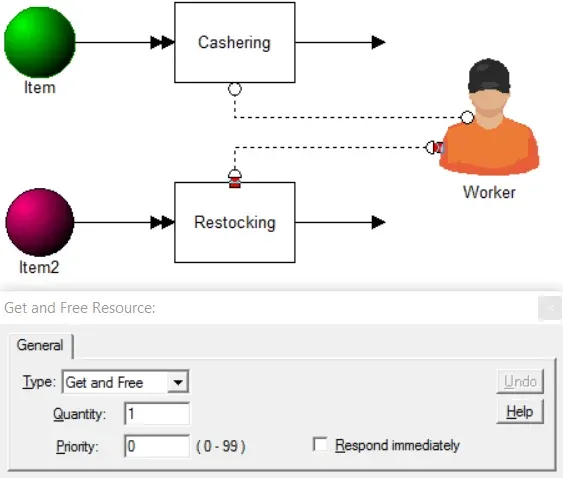
TO DO: Connect the worker to both Restock and Cashiering activities, but enter a priority of 1 for the cashiering connection. (The default for the other connection is a priority of 0.) When there are available cashiers, they will respond first to the cashiering activity since it has a higher priority.
To learn more about resources, see Resources and Resource Assignments.