

Resource Downtime and Maintenance
A resource can go offline during a run in three different ways: by random or scheduled downtime, by the end of a shift, and by an interruption that pulls people off their work.
Random or scheduled downtime
Section titled “Random or scheduled downtime”The Availability tab makes a resource unavailable part of the time, either a random percentage or a regular interval (see Resource Availability). This downtime waits for the current entity to finish, so it never interrupts work in progress. Use it for breakdowns and unplanned stoppages.
Interrupting work
Section titled “Interrupting work”The shift Downtime Rule decides what happens to the entity a resource is working on when the resource goes offline:
- Finish Current: finish the entity, then go offline (the default).
- Preempt & Wait: stop immediately; the entity waits for the same resource to return.
- Preempt & Pass: stop immediately; another available resource can pick up the work.
- Clear Queue First: finish the current entity and everything already queued, then go offline.
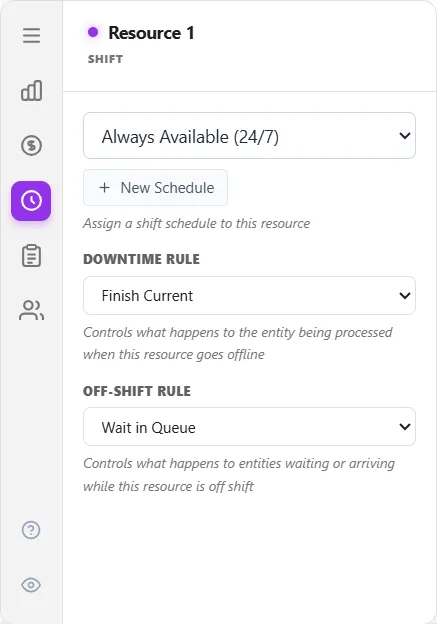
For scheduled maintenance, model the maintenance window as a shift (planned off-shift time) or as Time-mode availability. There is no separate maintenance object.
A unit that moves along paths
Section titled “A unit that moves along paths”For a resource with Moves along paths ticked, a shift end and the start of a break follow the same Downtime Rule, applied to where each unit is and what it is doing:
- A unit carrying a load always delivers it first, as overtime, whatever the rule. Nothing is put down on the way. A unit that carries its part through several steps finishes the whole carry, to its Free, as overtime.
- Finish Current: the unit finishes its job, picking up and delivering, as overtime. In a pool of two or more, the free units stop where they stand at the shift end and take no new call while one unit finishes its work. Only a call of priority 10000 or more takes one of them.
- Clear Queue First: the unit finishes its job, then the pool serves the calls that were waiting at the shift end, then goes off.
- Preempt & Wait: a unit on its way stops, a Person at once and a Vehicle at the next node, and its call waits for that same unit. Work at a step stops and waits for the unit, as for any resource.
- Preempt & Pass: a unit on its way stops and its call goes back to the pool, where the closest unit on shift takes it. Work at a step is taken over by another unit, which drives there first.
A unit goes off shift where it stops and starts the next shift from that place. A free unit at a break, an interruption or a downtime stops where it is, and its Return home rule starts again when it is back. While every unit is off shift, the Off-Shift Rule decides what happens to a call to collect a part: Wait in Queue keeps the part waiting at its pickup, and Balk (Leave System) takes it out of the model.
A unit that picks orders with nothing aboard stops where it is at a shift end, and its order waits for it next shift. Under Preempt & Pass the rest of the order goes back to the list for any unit, and under Clear Queue First the order in hand and every released order are finished as overtime.
Random or scheduled downtime from the Availability tab starts only when a unit is idle, and not before it has finished any jobs it set aside for a rush job. An interruption that pulls people off their work stops a moving unit as a break under Preempt & Wait does, and a unit carrying a load delivers it first.
Interruptions that pull people off work
Section titled “Interruptions that pull people off work”The People tab holds an Interruptions table for meetings, questions and incidents that pull people off their work. Its first row is the Availability tab’s own Time Between Interruptions and Interruption Time, and it leaves the work in place (Drops everything reads no). Every extra row you add pulls people off the work in progress (Drops everything reads yes). The People tab is hidden until you switch it on with the eye icon at the foot of the tab column; see Resource.
LegacyHow this worked in the previous version
Taking a resource off a task to perform another whether or not it has finished the original task. Then the resource returns to the interrupted task to finish it.
Suggested Technique
Section titled “Suggested Technique”- Select the resource connection that is attached to the activity or routing that should always receive immediate attention.
- Check the Respond immediately box in the properties dialog of the resource connection.
Alternatively, you may use the GET or JOINTLYGET statements in the Action logic with a priority of 100 set off by a comma for the resource: GET Resource1, 100. (The 100 is an interruptive priority.) Connected resources will always be captured before resources specified in a GET statement. On the other hand, resource connections that free a resource occur after any Action logic for the activity.
Example: A receptionist must type up dictations and answer the phone. When the phone rings the receptionist must interrupt typing the current dictation and answer the phone.
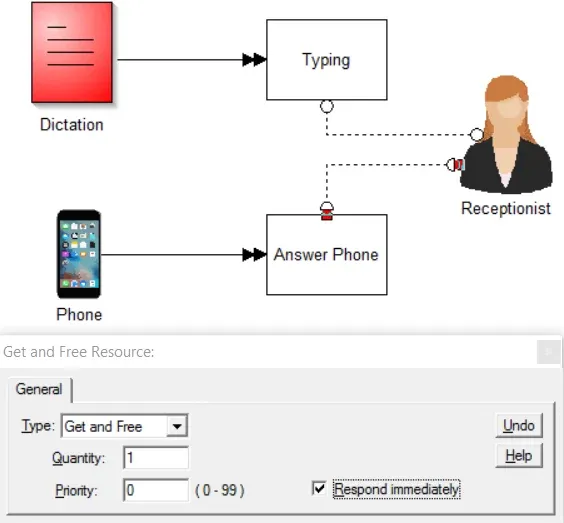
TO DO: Make the connections and check the Respond immediately box as shown above.
Scheduled equipment maintenance
Section titled “Scheduled equipment maintenance”Scheduling equipment for regular maintenance so that it is unavailable for use during certain periods. (If maintenance is done during off hours, it can be safely ignored in the model.)
Suggested Technique
Section titled “Suggested Technique”- Assign a shift to the resource to indicate scheduled downtime (for maintenance or other purposes). For information on creating and assigning shifts, see Defining & Editing Shift & Break Blocks.
Whenever possible, use the shift schedule for scheduled interruptions.