

Ordered Arrival
An ordered arrival is demand-driven replenishment: entities arrive only when a signal triggers a reorder, then appear after a lead time. Use it to model kanban or inventory-style flow, where downstream consumption pulls in new supply.
Settings
Section titled “Settings”- Signal Sources: one card for each activity or queue whose order trigger asks for this entity, showing its Reorder level and Qty, with a View button that opens the trigger.
- Signal lead time: the delay between the trigger and the entities arriving (a number or a distribution), with a unit chosen by the S, M and H buttons (seconds, minutes, hours).
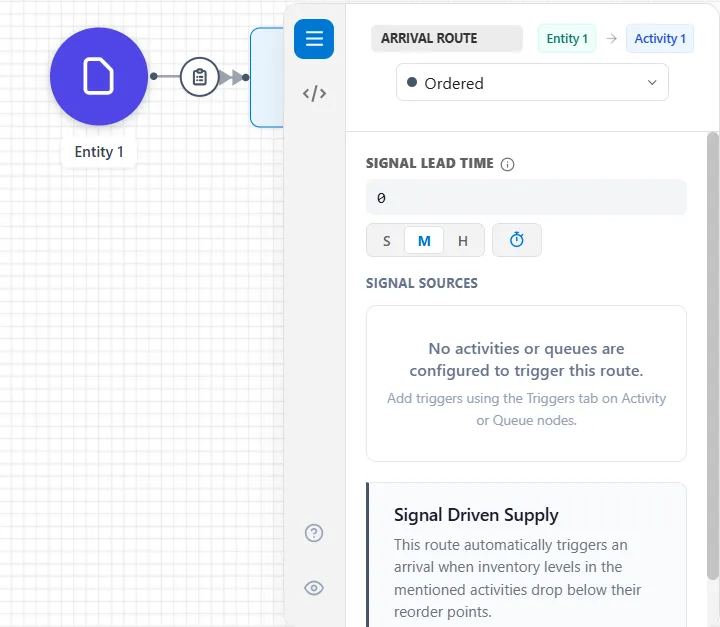
When the trigger fires, the order quantity of entities arrives after the lead time. Ordered arrivals have an Action Logic tab that runs for every entity they create.
What fires it
Section titled “What fires it”The other half of this feature is an order trigger, set on the Triggers tab of the Activity or Queue that consumes the entities. That is where the reorder level and the order quantity live: the trigger watches how many entities of this type are at that node, and orders more when the count falls below the level. Build the ordered arrival first, then add the trigger, which needs the arrival to exist before it can point at it.
The lead time set here is the one used, and it is worked out at the moment the order is placed, when no entity exists yet. It can be a number, a distribution, or a variable, but not an entity attribute.
This is different from a scheduled arrival, which brings entities in at fixed times you list. An ordered arrival is triggered by demand, not by the clock.
LegacyHow this worked in the previous version
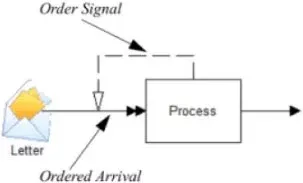
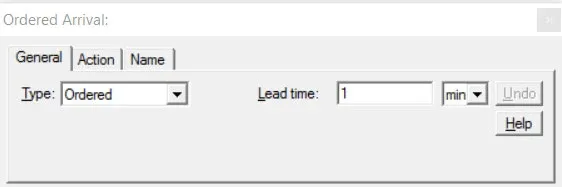
An ordered arrival is used in connection with an order signal connection to place an order for more entities to arrive (see Order Signals).
Lead Time This is the time required for the entities to arrive once an order is placed. Any expression excluding attributes is valid.
Order signals
Section titled “Order signals”An Order Signal is a connection from an activity or storage to an Ordered arrival or routing which notifies the arrival or routing to order or release additional entities. The signal is triggered by a drop in inventory level at the storage or activity input queue.
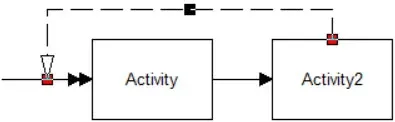
Reorder Level The level to which the storage or activity input queue must drop before signaling an order for more entities. Any expression is valid.
Order Quantity The quantity to order when an order is placed. Any expression is valid.
Place order at start Check if an initial order is to be placed at the beginning of the simulation run. If the initial order is insufficient to raise the queue or storage level above the reorder level, a Periodic arrival should be defined, in addition to the Ordered arrival, with its First time field set at time zero (0) to initialize the inventory level (see Periodic).
When an order signal is used to order entities at an arrival connection, the arrival type must be Ordered.
For ordering to continue, the inventory level must rise above the reorder point. If inventory trickles in and never rises above the reorder point, another re-ordering method must be used: for example, Continuous along with WAIT UNTIL.