There is a technique that lets you schedule high-volume production, in the millions of entities, without slowing the simulation. Scheduling at those volumes sounds impossible, but it is not, and it is simple to put in place.
Recently we built a model for a pharmaceutical company that changed its production line to a new product every 2 to 24 hours. The volumes were not high enough to justify dedicated lines, so each temporary line was assembled quickly from different equipment to match the product specs, and the range of products created hundreds of possible equipment configurations. Total production for the week could exceed one million units, while individual orders ran from 2,500 to 250,000 bottles.
We needed to schedule many different products with a combined volume of more than a million units, but scheduling large quantities created a bottleneck at the processor’s internal cache, and that slowed the simulation. As an example, loading 200,000 units into a single location took 50 seconds just to place the entities.
The high-volume production problem
Before the solution, it helps to understand the problem. A simulation slows down when the event engine is overloaded, because the engine has to track every entity in the model. The more items it monitors, the longer the simulation takes.
For multiple high-volume arrivals, the only realistic choice is the scheduled arrival, where entities enter the receiving location at the precise time of the arrival. If five orders totaling 200,000 units are scheduled for Monday at 8:00 AM, then 200,000 entities arrive at 8:00 AM. You might ask why not stagger the arrivals. That can be reasonable, except the arrival timing is usually not known in advance. You may have to run the model to determine it, and if any part of the model changes, the timing has to be redone, so staggering production with precise timing is not practical.
Keep two things in mind. First, most high-volume systems only have a few thousand entities in active production at any moment. The high-volume part of the system lives in the units waiting to be processed and the finished product waiting for shipment, so the actual work in process is relatively small. Second, once an entity exits the model, it leaves the event engine and the simulation no longer has to track it. If entities are introduced only as they are needed and removed soon after production, the simulation stays fast and can process millions of items.
The high-volume production solution
Reduce the number of entities present in the simulation at the same time and the problem is solved. Scheduled arrivals are ideal for introducing products, because of the arrival date and the unique attributes each product carries, but having huge quantities enter a queue all at once is the part that bogs things down.
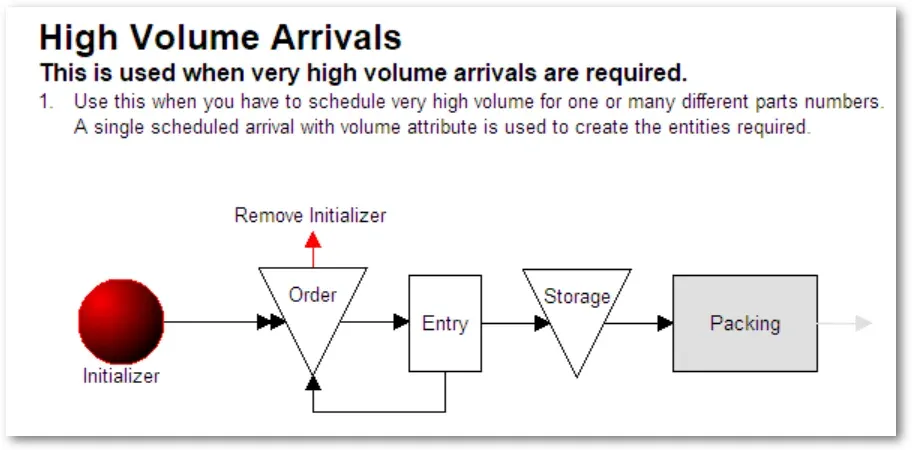
Instead of a large quantity arriving at once, use a scheduled arrival to introduce a single entity that carries a volume attribute. Then use that volume attribute to generate units through a create route. A create route does not add entities until there is room at the destination. For example, if a create route has a quantity of 500 but the receiving location has a capacity of 1, then 499 entities are scheduled but held out of the event engine until there is room at the receiving area. Using this technique, we built a model that processes more than 12 million entities and still runs efficiently.
In full disclosure, the solution is a little more involved than that. Because a single entity is only allowed to create 999 new objects, large orders need multiple creates to reach high volumes. Since that logic can be tricky for a newer user, ProcessModel created a simple model object that turns one entity with a volume attribute into millions of arrivals. You insert the object and then complete a few short tasks:
- Insert graphics for each product produced.
- Modify the arrival to include the arrival date and time of the order.
- In the action logic of each arrival, set the volume and the product identifier.
- Change the graphic after the create route to match the graphics inserted in step 1.
The high-volume arrivals object applies to pharmaceutical, manufacturing, food processing, consumer products, insurance processing, and more. Any time you face high volumes, this is a simple way to model the process, and the object takes less than a minute to implement. It is housed in the arrivals section and is called High Volume Arrivals.
Additional model objects are designed to work alongside it:
- High Volume Inspection
- High Volume Queues and Accumulating Conveyors
- High Volume Boxing
- High Volume Palletizing
Each of these objects is aware of the others. If an order has 50,000 items but 109 are rejected, the boxing and palletizing logic adjusts to the reduced quantity, and partial boxes and pallets are allowed to finalize for an entity type. Products are separated automatically so only one kind of product goes in a box, and accumulating conveyors account for product size, which sets how many units can queue on the conveyor. All of this logic is built in and automatic, driven by the scheduled arrivals. To see how this fits your own process, explore what ProcessModel can do.